Data Integration Notifications
Last updated: July 13, 2026
Overview
Global Administrators can opt to be notified if their data stream suddenly changes in size. When data streams suddenly change in size, this results in Panorama pausing the updating of data for the night to protect against accidental deletion or addition of data. Clients who experience this error and opt to be notified will be notified via the email associated to your user account.
Who gets notifications?
Users who have the Global Administrator role will see the option to subscribe to data error notifications caused by significant changes to the size of their data within their notification preferences. Users without this role will not see this option within their notification preferences.
Notification Settings
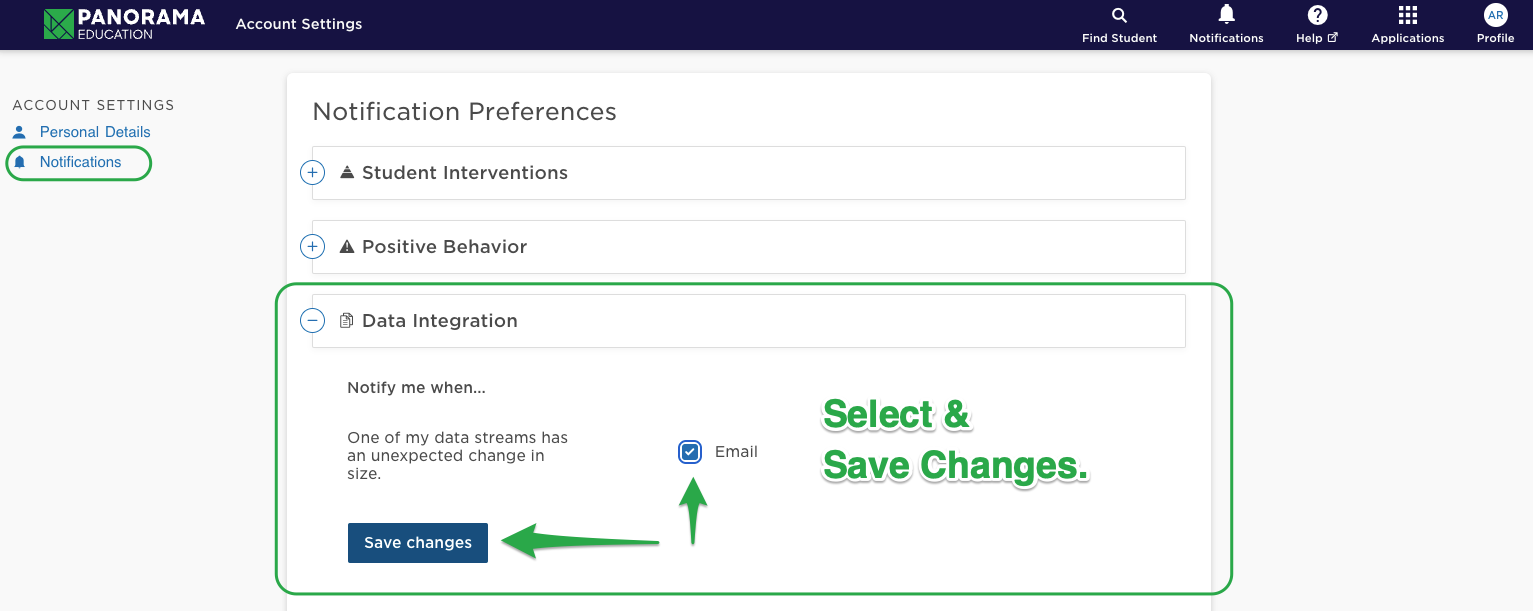
To update settings to receive the data integrations notifications, Global Administrators can go to Account Settings. Select Notifications from the left toolbar. Then, select Data Integration to expand that option. Select Notify me when… one of my data streams has an unexpected change in size by checking the box next to Email. Save changes.