Confidentiality Protected in Classic Reports (Legacy)
Last updated: September 2, 2026
In Classic Reporting, you may see a demographic group titled "Confidentiality protected" that contains the responses of individuals in a small group combined with the next smallest demographic group. If there are demographic groups you expect to see but do not, that means they are included in the "Confidentiality protected" group.
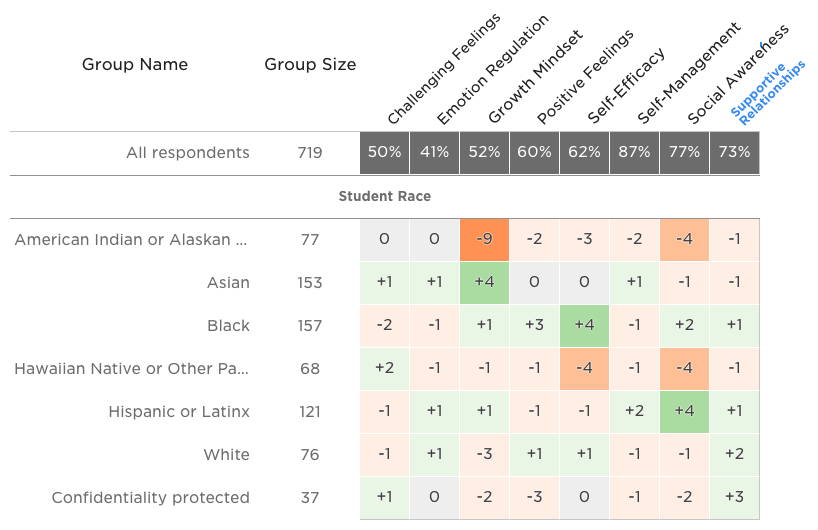
In the example above, imagine that four students who identify as multiracial responded to the survey. Their responses would not appear in their own row, but instead would be included in the "Confidentiality protected" row along with the next few smallest demographic groups, even if the larger group contains more than 5 responses.
"Confidentiality protected” labels showing in combined demographic groups
You may see a demographic group that combines multiple demographics and contains the responses of individuals in a small group combined with the next two smallest demographic groups. By combining these demographics, we are able to show useful data for action planning while still protecting the confidentiality of small demographic groups.
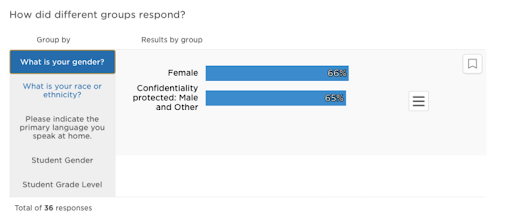
No combined groups will be shown when there are four or more demographic groups that do not meet our confidentiality threshold. In these cases, you will only see the "Confidentiality Threshold" label.
Please note that adjustments to confidentiality-protected groups and the confidentiality threshold can only be made at the discretion of your district leaders. Please contact your district leaders or support at support@panoramaed.com> for more assistance.