Best Practices for Setting Up Knowledge Bases in Solara for HQIM Tools
Last updated: October 19, 2026
Knowledge Bases in Solara with Class Companion help districts organize high-quality instructional materials (HQIM) and connect them to custom tools. Instead of attaching the same documents to multiple tools—or running into limitations with the number of files that can be added to a single tool—your district can upload materials once and reuse them across related workflows.
This article will help district leaders design focused Knowledge Bases that support educators in using approved instructional materials while maintaining consistency with district expectations.
What You'll Learn
In this article, you’ll learn how to:
Organize instructional materials around a clear purpose
Connect instructional materials and district guidance to related custom tools
Select documents that address real educator questions
Maintain Knowledge Bases as materials and expectations change
Overview: What is a Knowledge Base?
A Knowledge Base (Figure 1) is a centralized collection of district documents that connected custom tools can search when responding to educators.
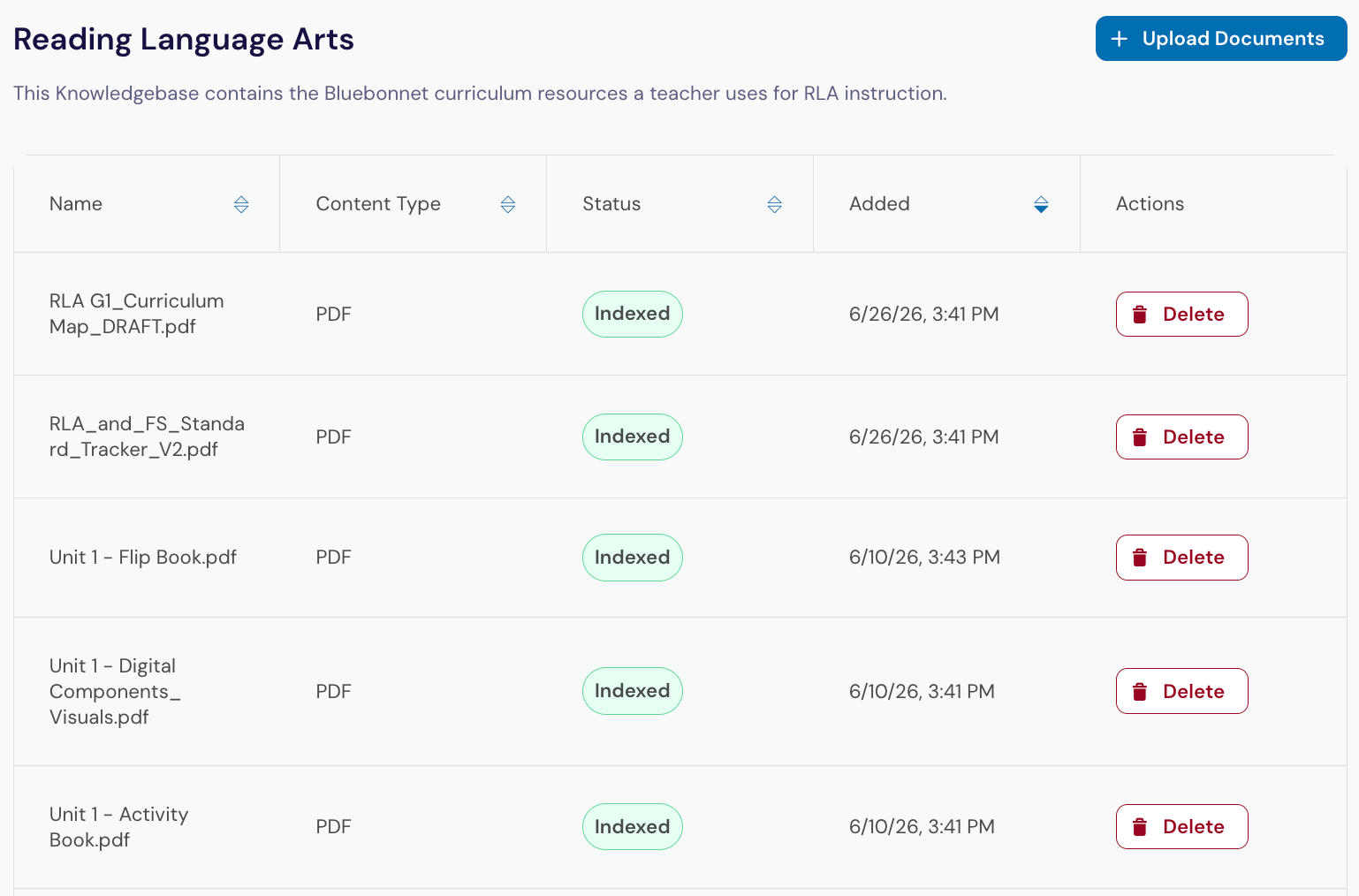
When an educator uses a connected custom tool, Solara identifies information from the Knowledge Base that is relevant to the request and uses it as context for the response. The response includes source information showing which document and passage informed the answer, making it easier for educators to review the source material.
Your district can connect one Knowledge Base to multiple custom tools. A single custom tool can also use multiple Knowledge Bases when the workflow requires more than one type of context.
For example, a lesson support tool could reference both:
A Knowledge Base containing instructional materials for a specific program
A Knowledge Base containing district instructional expectations and lesson internalization guidance
Important: Your role needs Manage Knowledge Bases to create, edit, remove, or control product access for Knowledge Bases. Find this permission under Platform Admin → Roles and Permissions → Platform. You also need access to Platform Admin.
Why Use Knowledge Bases for HQIM-Related Custom Tools?
When developing custom tools in Solara to assist educators with the delivery of curricular materials, districts often need to organize a large number of teacher guides, unit materials, lesson resources, assessments, and implementation documents across subjects and grade levels.
Without Knowledge Bases, administrators are limited to attaching a small set of files directly to each custom tool, or building separate tools for individual units, grades, or subjects. This can create duplicated work and make materials harder to update consistently.
Knowledge Bases give districts a more scalable way to:
Manage large collections of instructional materials
Connect the same materials to multiple educator workflows
Update shared materials in one place
Combine program-specific materials with district guidance
Help educators verify which sources informed a response
Knowledge Bases in Solara support PDF, DOCX, PPTX, and TXT files. Files can be uploaded in batches of up to 100, and each Knowledge Base can contain hundreds of documents. Each uploaded document passes through Panorama’s safety guardrails before it becomes available to connected tools.
Example: Building a Districtwide HQIM Ecosystem
The most effective districts often use multiple Knowledge Bases together rather than creating one large collection of documents.
Organize Knowledge Bases around recognizable collections of materials that educators will use for a related purpose.
Here is one possible district structure:
Knowledge Base | Purpose | Connected Custom Tool(s) |
|---|---|---|
Wit & Wisdom | Store teacher guides, pacing guides, lesson resources, and unit materials | Wit & Wisdom Assistant Tool |
History Alive! | Store teacher guides, pacing guides, lesson resources, and unit materials | History Alive! Support Tool |
District Implementation Resources | Store instructional frameworks, walkthrough tools, look-fors, and HQIM evaluation rubrics | Wit & Wisdom Support Tool + History Alive! Support Tool |
This approach helps districts maintain a clear separation between instructional materials and implementation guidance while ensuring that educators receive consistent, curriculum-grounded and district-aligned support.
Best Practices for HQIM Knowledge Bases
Define One Clear Purpose
Each Knowledge Base should represent a recognizable program, subject area, framework, or body of guidance.
A focused Knowledge Base helps administrators understand what belongs in the collection and helps Solara retrieve information relevant to an educator’s request.
A Knowledge Base can still contain hundreds of documents. The goal is not to create the smallest possible collection. Instead, keep documents together when they serve a shared purpose and are likely to be used in the same workflows.
Separate Unrelated Types of Guidance
Avoid using one Knowledge Base as a general storage location for every instructional document in the district.
Instructional materials and district implementation guidance often serve different purposes. Keeping them in separate Knowledge Bases allows your district to update and manage each collection independently.
An instructional materials Knowledge Base might include:
Teacher guides
Unit overviews
Lesson slides and resources
Scope and sequence documents
Pacing information
Assessments and scoring resources
A district implementation Knowledge Base might include:
Instructional frameworks
Lesson internalization protocols
Walkthrough tools
Implementation guides
District instructional expectations
AI use guidance
When a workflow needs both types of information, connect both Knowledge Bases to the custom tool.
Include Materials Educators Use During Instruction
High-level planning documents may not provide enough detail to support day-to-day educator questions.
Along with unit plans and pacing information, consider including practical resources such as:
Facilitation guides
Graphic organizers
Discussion protocols
Vocabulary routines
Student exemplars
Learning progressions
Lesson internalization guides
These materials provide additional context about how the instructional materials are intended to be used in classrooms.
Build Around Real Educator Questions
Before uploading documents, identify what educators will need the connected custom tools to help them accomplish.
Teachers may want support answering questions such as:
What is the learning priority for this lesson?
How can I provide additional scaffolds while maintaining the lesson’s expectations?
What should remain consistent when I adjust the lesson?
What does proficiency look like for this task?
Instructional coaches and leaders may need to answer:
What misconceptions should educators anticipate?
What should be visible during classroom implementation?
How does this lesson reflect district instructional expectations?
Which resources could support an upcoming coaching conversation?
Use these questions to determine whether the Knowledge Base contains enough information to support the intended workflows.
Connect Knowledge Bases Intentionally
Connecting a Knowledge Base to a custom tool makes its entire collection available as context for that workflow. Select only the Knowledge Bases that directly support the tool’s purpose.
After connecting them, preview the tool using realistic educator requests. Review whether the response:
Addresses the requested grade, lesson, or unit
Reflects the instructional materials accurately
Follows relevant district guidance
Identifies appropriate source documents
Avoids introducing information that conflicts with the materials
For step-by-step instructions, see Create and Use Knowledge Bases in Solara.
Keep Materials Current
Review Knowledge Bases whenever instructional materials, pacing guidance, assessments, or district expectations change.
During each review:
Replace superseded versions
Remove outdated or duplicate documents
Confirm that the Knowledge Base name and description remain accurate
Preview connected custom tools after significant updates
Confirm that each file is current, authoritative, and approved for district use
Updating a Knowledge Base changes the context available to every connected custom tool. As a result, responses may also change after documents are added, removed, or replaced.
Frequently Asked Questions
How is a Knowledge Base different from a file uploaded to a custom tool?
Files uploaded directly to a custom tool provide context only for that tool and are limited to five files. A Knowledge Base can contain hundreds of documents and provide reusable context to multiple custom tools.
Can different tools use the same Knowledge Base?
Yes. For example, the same instructional materials Knowledge Base could support lesson planning, pacing, differentiation, and assessment workflows.
Can I connect multiple Knowledge Bases to one tool?
Yes. This is useful when a workflow needs to reference both instructional materials and another collection, such as district implementation guidance.
What happens when documents are updated?
Connected custom tools will use the updated collection as context. Preview and test the tools after significant changes to confirm that their responses remain accurate and useful.
— — —
Well-organized Knowledge Bases help districts use approved instructional materials across multiple custom tools without repeatedly uploading or maintaining the same documents. By organizing collections around clear purposes, educator questions, and related workflows, districts can provide more consistent support for HQIM implementation.